Every lead you have, on one screen.
The company and why it matched, the director when the public record names one, the email and where it stands, and the website and social pages we could confirm are theirs.
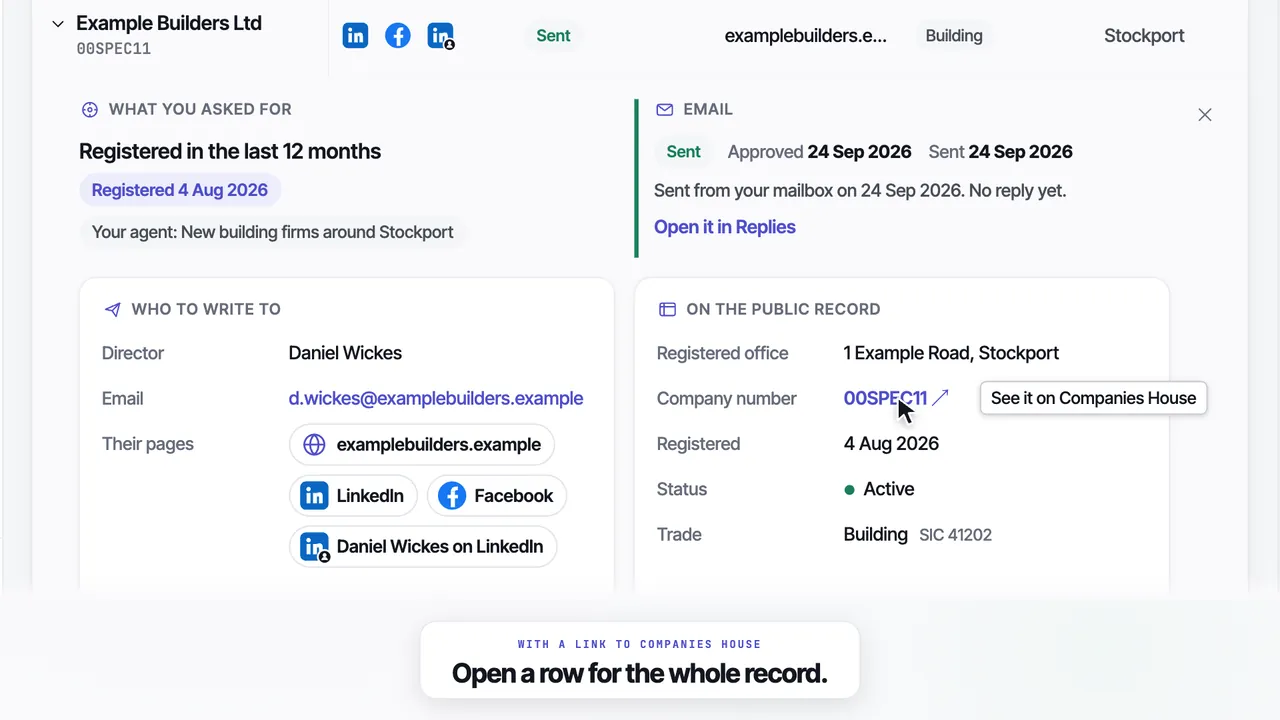
Everything about a company, in one row.
Every column filters, and every email says where it stands in plain words, such as not emailed yet, waiting to send, sent, replied or bounced.
| Company | Intent | Director | Social | Emailed | Added | |
|---|---|---|---|---|---|---|
| Example Joinery Ltd | Daniel Wickes | d.wickes@examplejoinery.example | Replied | 22 Sep | ||
| Example Glazing Ltd | Grace Hollis | info@exampleglazing.example | Sent | 22 Sep | ||
| Example Roofing Ltd | Tom Ashby | tom@exampleroofing.example | Waiting to send | 23 Sep | ||
| Example Interiors Ltd | hello@exampleinteriors.example | Not emailed yet | 24 Sep | |||
| Example Kitchens Ltd | Owen Pryce | owen@examplekitchens.example | Bounced | 19 Sep |
Specimen rows. In the app the website, the trade and the location have columns of their own, and a bounced first email is credited back automatically.
One company
Open any row to see what you asked for, the email, who to write to, their pages and the public record.
- A link to the company on Companies House
- The email, and why it has not gone if it has not
- Their website and social pages in one place
Filters
Every column filters, and the search box finds a company, a place, a trade, a name or an email. Then download exactly what you see.
- Show only the leads with the pages you pick
- Every email status, in plain words
- A CSV of the rows on screen, on paid plans
- Website
- Director on LinkedIn
The rest of Leads, a line each.
Bounces credited back
If a first email bounces, that lead goes back on your balance automatically.
Your 25 free ones too
Every company we have found for you is here, from your first day on the trial.
No phone numbers
Each lead carries an email, a website and the social pages we could confirm instead.
Skipped stays yours
A company you skipped on the Feed is not emailed, and it stays here for you to use.
Saved from Chrome
Companies you save with the Chrome extension are listed here with the rest.
Sort the list
By company, director, trade, town, intent, email status or the date it was added.
The rest of the product
Questions
01What is on each lead?+
The company, and its intent: what you asked your agent for and the dated fact that matched. Then the director's name when it is on the public record, the email and where it stands, the website and social pages we could confirm are theirs, the trade, the location and the date it was added.
02Which social pages do you find?+
The company's website, its LinkedIn page, the director's LinkedIn, Facebook and Instagram. We only show a page we could confirm belongs to that company. If we could not confirm one, the cell stays empty rather than showing a guess.
03Can I download my leads as a CSV?+
Yes, on any paid plan. Filter the list however you like, and the download holds exactly the rows you are looking at. The free trial shows every lead on screen but does not include downloads.
04What happens if an email bounces?+
If a first email bounces, that lead is credited back to you automatically, and its status on Leads says Bounced. The Desk also shows how many bounced this week and how many were credited back.
05Do you include phone numbers?+
No. Every lead carries an email, a website and the social pages we could confirm, and no phone numbers. Emailing a published business address and cold calling sit very differently under UK rules.
06Are my free trial leads on it?+
Yes. Every company we have found for you is on Leads, including your 25 free ones, the ones you skipped on the Feed and any you saved with the Chrome extension.
Tell it who you sell to and your first 25 leads arrive free, each with its email and the pages we could confirm. No card.
No card · 25 free leads · 25 free emails · Cancel in the app