Your email, in your colours, written for each company.
Add your logo, pictures, a video and your social links once. The AI writes the words for each company, starting from the reason it is worth an email today.
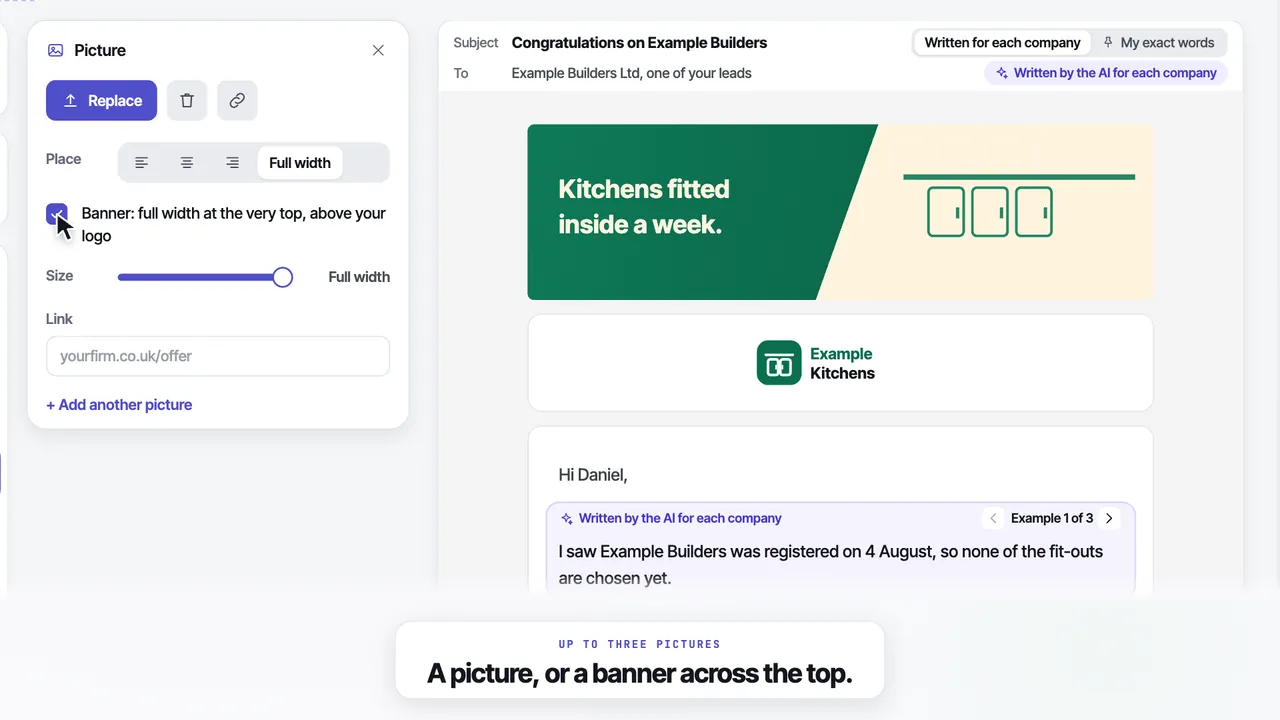
What is in the email, and who writes each part.
You set the look once. The AI writes the words for each company, and anything you want word for word goes out exactly as you typed it.
Hi Daniel,
Example Joinery’s first accounts are due on 30 September, and a first year-end is usually when the books get set up properly.
I look after the books for joiners and builders across Leeds, and I file first accounts for a fixed fee. AI writes it
If that would help, reply and I will send you a price. My exact words
Example Accountancy Ltd, Leeds. Then two short lines we add: who sent it, and where the details came from, with a link to be removed.
- 01Your logo
Trimmed and sized for you. Copy my website's look can fetch it from your homepage. - 02The first line
Always written for this company, from the reason it is worth an email today. - 03Your words
Each section is either AI writes it, from your brief, or My exact words. - 04A picture or a banner
Up to 3 pictures. More than one makes the Promotions tab more likely. - 05A video
Shown as a picture with a play button. A click opens a page with your name on it. - 06Your sign-off
Your name, then your links: website, LinkedIn, Facebook, Instagram and the rest.
Two looks
Letter is a plain white email, and it is the default. Designed puts your logo and message in white cards on a page of your colour.
- Letter is more likely to reach the main inbox
- Your colours, taken from your website if you like
- Switch between them at any time
A logo, more than one picture or the Designed look can put an email in Gmail’s Promotions tab. The Template tells you as you choose.
A video
Mail apps cannot play video, so the email shows a picture with a play button. A click opens a page with your name and business on it, where the video plays.
- A link from YouTube, Vimeo, Loom, Google Drive or Dropbox
- Or upload a file up to 100 MB
- The page carries your name and your business
The rest of the Template, a line each.
Copy my website's look
It reads your homepage and offers your logo and colours. Nothing changes until you press Use.
Two follow-ups
On day 4 and day 9 by default, each written for that company. They stop when the company replies.
Versions by agent
Give an agent its own version of the email. Every other agent uses your main one.
Send me a test
It arrives in your own inbox, sent from your own mailbox when one is connected.
Your links
Website, LinkedIn, Facebook, Instagram, X, YouTube, TikTok or WhatsApp, under your name.
Built by talking
Tell the assistant about your business and it can build the whole template for you.
The rest of the product
Questions
01Will my email land in the Promotions tab?+
It can, and the Template tells you which choices make that more likely. Letter, a plain white email, is the default and is more likely to reach the main inbox. A logo, more than one picture or the Designed look can put an email in Gmail's Promotions tab. We do not quote an inbox rate, because nobody can promise one.
02Can I put a video in a cold email?+
Yes, in the way that works. Paste a link from YouTube, Vimeo, Loom, Google Drive or Dropbox, or upload a file up to 100 MB. Mail apps cannot play a video inside an email, so the email shows a picture with a play button. A click opens a page with your name and business on it, where the video plays.
03Does the AI write every word?+
Only where you want it to. The first line is always written for each company, from the reason it is worth an email today. Every other section is set to AI writes it, from a short brief you give, or My exact words, which go out exactly as you typed them.
04How do the follow-ups work?+
Two follow-ups go on day 4 and day 9 by default, each written for that company. They stop as soon as the company replies, so nobody who has answered you is chased.
05Can different agents send different emails?+
Yes. Give an agent its own version of the email, so builders and cafes can hear different things. Any agent without a version of its own uses your main email.
06How do I see it before it goes out?+
Press Send me a test and it arrives in your own inbox, sent from your own mailbox when one is connected. The Feed also shows every email exactly as it will be sent, before you approve it.
Your first 25 leads and your first 25 emails are free, from your own mailbox. No card.
No card · 25 free leads · 25 free emails · Cancel in the app