Emails go from your own mailbox, a few a day at first.
Connect Gmail or Google Workspace with one sign-in. A new mailbox starts at 5 emails a day and sends more as it warms up, on the days and hours you choose.
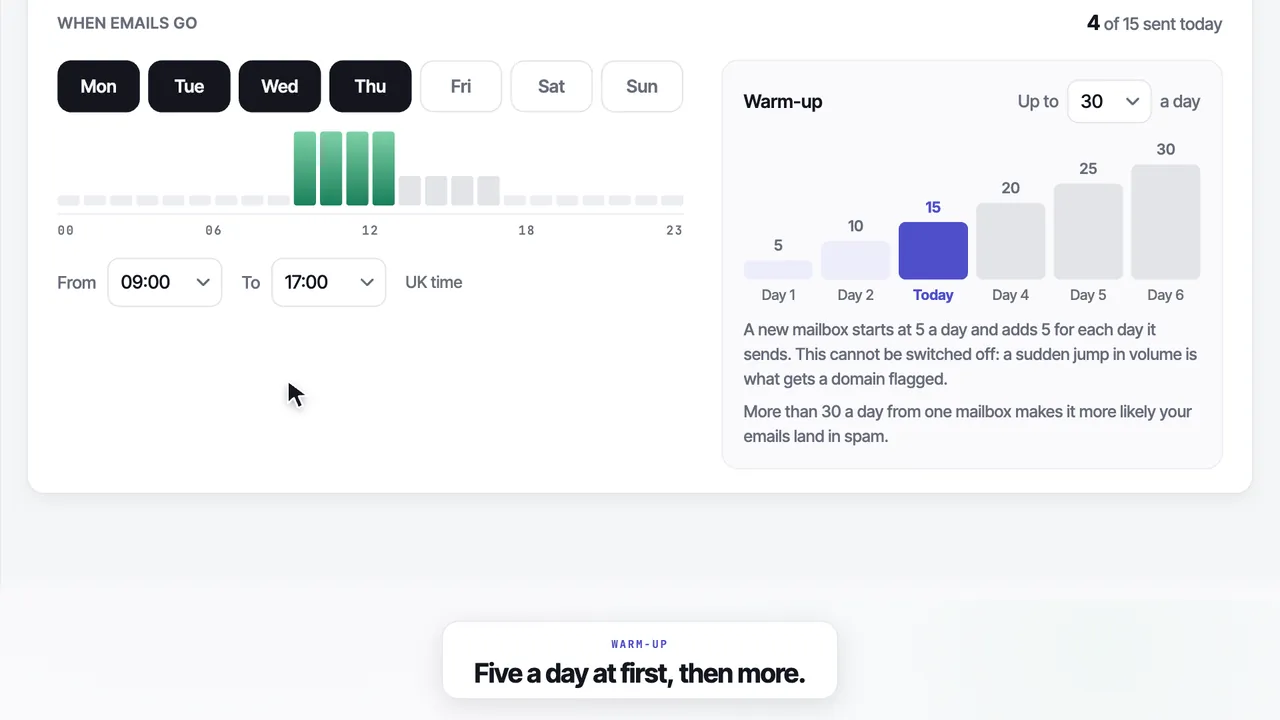
It starts at 5 a day, and earns the next step.
Send 200 emails on day one and the inbox providers notice. So a new mailbox sends 5, then 10, 15, 20, 25 and 30, one step for each day it actually sends.
- 01It moves up after a day it sent
A day with nothing to send does not count, so a new mailbox is never pushed ahead of itself. - 02You cannot switch it off
A sudden jump in the number of emails is what gets a domain flagged. - 03It stops at the most you set
Anywhere from 5 to 50 a day. Above 30 the page warns you about spam.
Your mailbox
Connect with one Google sign-in. We ask to send emails as you and to read the replies to those emails, and nothing else in your inbox.
- No passwords and no SMTP settings
- Every email sits in your own Sent folder
- Replies come straight back to your inbox
Domain check
When you connect, it reads your domain’s email settings and shows what is missing, with the record to add and where it goes.
- SPF, DKIM and DMARC, each in place or not
- Step-by-step fixes for Google or Microsoft
- A personal Gmail address needs nothing set up
Value: v=DMARC1; p=noneThe rest of sending, a line each.
Your days and hours
Monday to Friday, 09:00 to 17:00 UK time, by default. Both are yours to change.
A reply stops the rest
The moment a company replies, its follow-ups stop. Nobody who has answered is chased.
Removed within 24 hours
Anyone who asks to be removed is removed within 24 hours.
More than one mailbox
Each one warms up on its own, and a follow-up always goes from the mailbox that sent the first email.
Warned on the Desk
If your domain's SPF and DKIM both fail, the Desk warns you, on the first screen you see.
Your first 25 free
On the free trial your first 25 emails go from your own mailbox, with no card on file.
The rest of the product
Questions
01Which mailboxes can I connect?+
Gmail or Google Workspace, with one Google sign-in, and Outlook where your account offers it. There are no passwords and no SMTP settings to type. Emails go from your own address and sit in your own Sent folder, so replies come straight back to you.
02What can Leadistry see in my inbox?+
Only what it needs. We ask to send emails as you and to read the replies to those emails, and nothing else in your inbox.
03How does the warm-up work?+
A new mailbox sends 5 emails a day, then 10, 15, 20, 25 and 30. It only moves up after a day it actually sent, so a quiet week never jumps you ahead. You cannot switch the warm-up off, because a sudden jump in volume is what gets a domain flagged.
04Can I choose when emails go?+
Yes. Sending days are Monday to Friday and hours are 09:00 to 17:00 UK time by default, and both are yours to change. So is the most a day, from 5 to 50. Above 30 the page warns you, because more than 30 a day from one mailbox makes it more likely your emails land in spam.
05Do I need to set up SPF, DKIM and DMARC?+
If you send from your own domain, yes. The domain check marks each one as in place or not, with step-by-step fixes for Google or Microsoft. A personal Gmail address needs nothing set up, because Google does it for you.
06Can this get my domain marked as spam?+
It can if a mailbox sends badly, and no tool can promise otherwise. What helps is built in: the warm-up, sending only on your days and in your hours, the domain check, and follow-ups that stop when someone replies. Anyone who asks to be removed is removed within 24 hours.
Your first 25 leads and your first 25 emails are free, sent from your own mailbox. No card.
No card · 25 free leads · 25 free emails · Cancel in the app